Sizes and bases
How big Mimic makes a mini, what it stands on, and how to change either later. The same choices are in New Mini, Resize and Import a 3D Model, under Size & printer.
Your nozzle is set once, in Settings. Mimic remembers what you size for, and the base's shape, floor and magnet from one mini to the next, since most people keep one printer and one table.
Choose your nozzle
The nozzle is the tip your printer prints through. Choose yours once, in Settings → General → Your printer's nozzle (Change… beside Nozzle opens it), and every new mini is sized for it:
| Choice | Good for |
|---|---|
| 0.2 mm · fine | The most detail: sharp faces, beard braids, belt buckles. Slow. |
| 0.4 mm · standard | Faces and weapons come out clearly; hair and cloth edges get softened. Most printers come with this one. |
| 0.6 mm · fast | Quick and sturdy, but small details blur. Best at 54 mm scale or bigger. |
Not sure? It's most likely 0.4 mm. Choose the same nozzle in your slicer. The nozzle also sets how much thin parts are thickened (see Thin parts), and each mini's page shows the slicer settings for it.
Resize and Edit & Make Again… start from the nozzle the mini was made with. If that isn't the one in Settings, Nozzle says so, with a button to use the one in Settings instead.
Size a character for your table
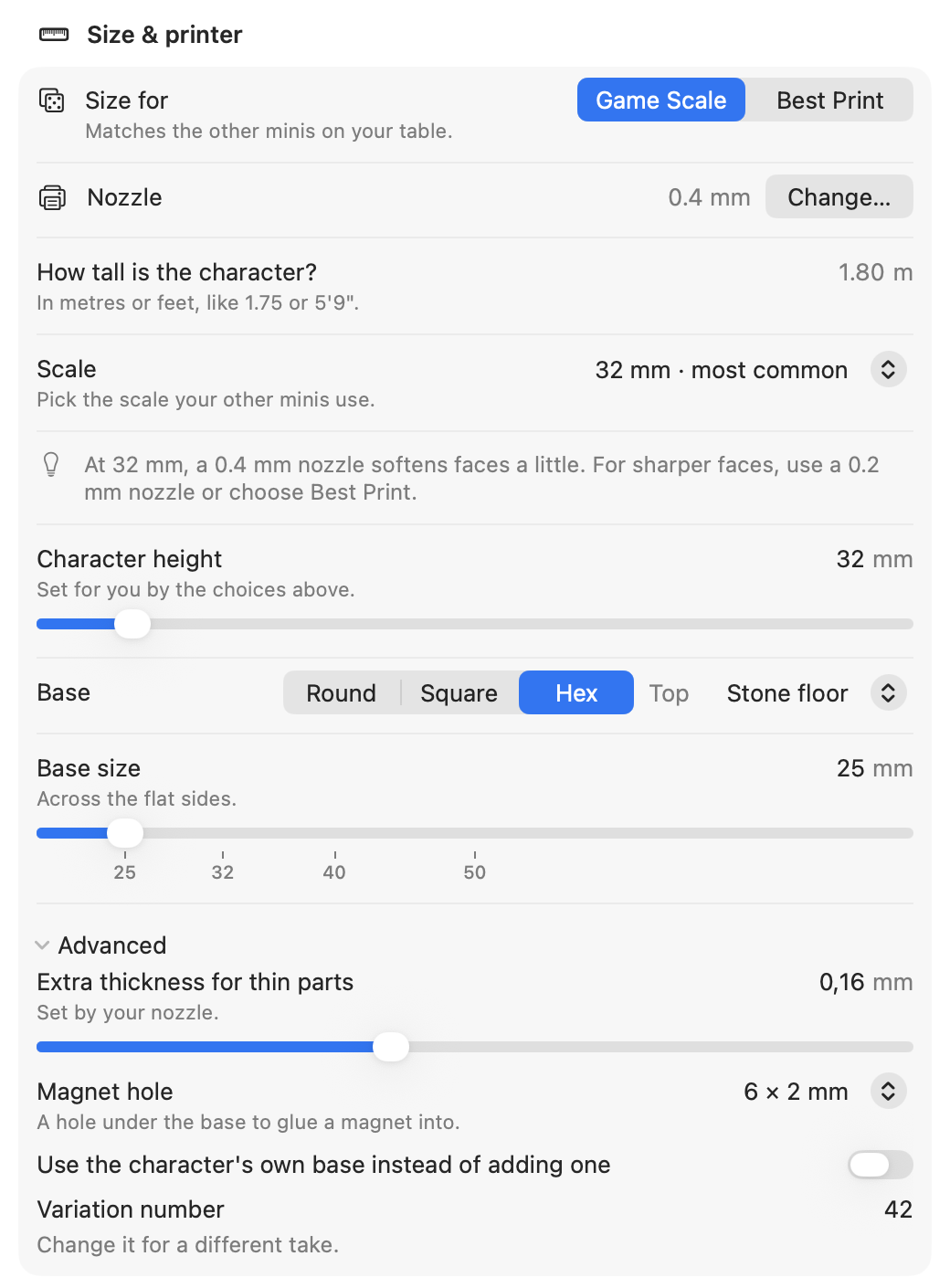
Size for has two choices:
- Game Scale matches the other minis on your table.
- Best Print goes big enough for faces to come out clearly on your nozzle.
Game Scale
Pick the Scale your other minis use, and say How tall is the character? in real life. Mimic works out the mini's height: at 32 mm, an average 1.8 m human stands 32 mm tall, a 2 m tiefling a little taller, and a 1 m halfling about half that.
| Scale | An average human (1.8 m) | Base |
|---|---|---|
| 28 mm | 28 mm | 25 mm |
| 32 mm · most common | 32 mm | 25 mm |
| 35 mm · heroic | 35 mm | 25 mm |
| 54 mm | 54 mm | 40 mm |
| 75 mm | 75 mm | 50 mm |
Type the real height in metres or feet: 1.75, 1,80, 5'9" or 6 ft 2 all work. A number
over 20, such as 180, is taken as centimetres, so a giant can still be 8 metres. Leave it
blank for an average human. If Mimic can't read what you typed, it says so under the field and
uses 1.8 m.
Mimic keeps the real height with the mini. Resize This Mini… opens at its scale with the real height filled in, so you only pick a new Scale, and Resize All sizes each character from its own.
A tall character gets a bigger base: about 40% of its height, rounded to 5 mm, and never smaller than the scale's own base.
Small minis on a 0.4 mm nozzle
At 32 mm on a 0.4 mm nozzle, faces come out a little soft. They still print fine. Under 28 mm (or under 50 mm on a 0.6 mm nozzle) faces turn into bumps, and Mimic warns you. For sharper faces, use a 0.2 mm nozzle or choose Best Print.
Best Print
Best Print sizes the character so its face comes out clearly on your nozzle:
| Nozzle | Height | Base |
|---|---|---|
| 0.2 mm | 64 mm | 25 mm |
| 0.4 mm | 100 mm | 40 mm |
| 0.6 mm | 150 mm | 60 mm |
Chunky characters also look good a bit smaller.
Any height you like
Character height is filled in for you by the choices above. Drag the slider or type a value to set your own, anywhere from 15 to 200 mm. It's the character itself, feet to top: the base adds about 2 mm.
Choose a base
Base has a shape and a Top, side by side, and a size under them.
- Round, Square or Hex. Square and hex bases fit grid and hex maps, and the figure faces a flat side.
- Plain, or a floor pressed into the top of the base: Stone floor (flagstones), Wooden floor (planks) or Cobblestones. The stones or planks are part of the base, so they print, and the feet still stand firmly on it.
- Base size, from 20 to 80 mm, with numbered marks at 25, 32, 40 and 50 mm. You can type any size. For a round base it's the width across; for a square, each side; for a hex, across its flat sides. A 25 mm base fits one map square, and a 25 mm hex fits one hex of a 1-inch hex map.
Resize, Try Again and Make Another Version keep the base's shape, floor and magnet.
Add a magnet hole
Tabletop players often glue magnets under their bases, to hold minis on a steel sheet or in a tin. Open Advanced under Size & printer and choose a Magnet hole:
- None
- 5 × 2 mm
- 6 × 2 mm
- 8 × 3 mm
Each is a round magnet, across by tall. The hole goes up into the bottom of the base with a little room to spare, and the base gets a little taller to fit it. There's no magnet hole on a mini without a base.
Keep thin parts in one piece
Swords, staffs and capes can come out thinner than your nozzle can print. Mimic thickens thin parts to suit your nozzle: Extra thickness for thin parts, under Advanced.
| Nozzle | Extra thickness |
|---|---|
| 0.2 mm | 0.08 mm |
| 0.4 mm | 0.16 mm |
| 0.6 mm | 0.24 mm |
You can set it yourself, from 0 to 0.40 mm. More keeps swords and capes in one piece, but softens faces. If a mini still has thin parts that may break, its page says so: check it in your slicer before printing.
Keep the character's own base
Some pictures and models already stand on a base or a rock. Under Advanced, turn on Use the character's own base instead of adding one: Mimic flattens the bottom of what's there so it sits on the print bed, and adds no base of its own.
With it off, a base in your picture doesn't end up under Mimic's: the 3D engine copies it, and Mimic leaves its copy out and stands the figure on its own base instead. The figure is the height you chose from its feet, not from the bottom of that base. A mini you made with an older Mimic keeps both bases until you use Resize This Mini.
Size an object
When you make an Object (a teapot, a car, a chess piece), there's no scale to match. Instead, Longest side is its biggest size, whichever way that is: height, width or depth. Mimic suggests a size that keeps details clear on your nozzle:
| Nozzle | Longest side |
|---|---|
| 0.2 mm | 50 mm |
| 0.4 mm | 80 mm |
| 0.6 mm | 120 mm |
Change it to the size you want. An object stands on its own flat bottom, with no base. Turn on Add a base to give it one: it's sized to sit under the whole object, about 80% of its longest side (25 to 80 mm), and you can choose its shape, floor, size and magnet as for a character.
Change the size of a mini you've made
Right-click a mini → Resize This Mini… (Cmd+R), or use More on its page. Resize starts from the sizes the mini has now. Choose new ones and press Resize: Mimic makes the print file again, in about a minute. The mini itself doesn't change: the same shape, at the new size. If a mini is being made, the resize waits its turn in the queue. A mini that's waiting or being made itself can be resized once it's made.
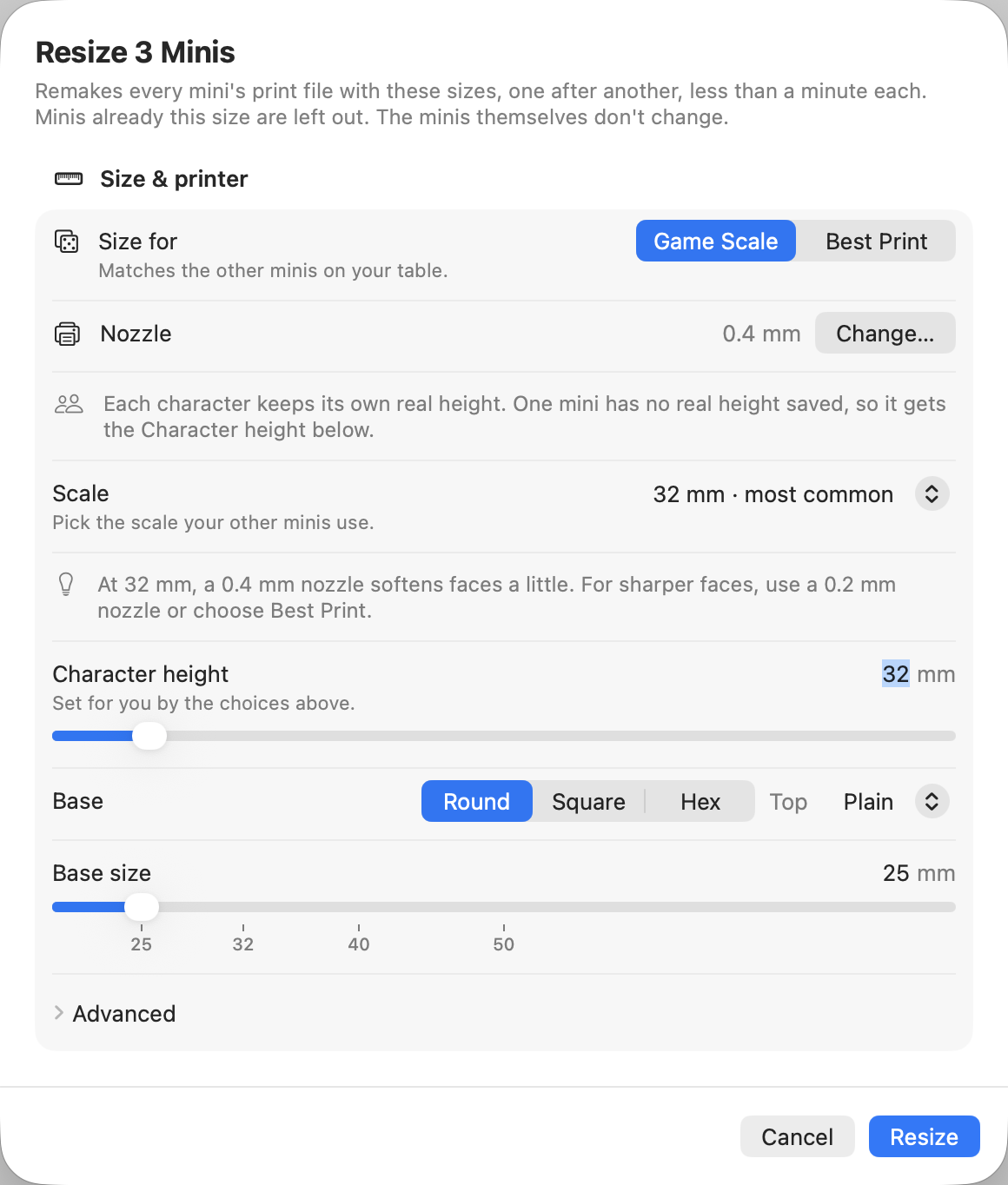
To resize several at once:
- Select several minis (Cmd-click or Shift-click), then right-click → Resize N Minis….
- Or right-click a project → Resize All….
Choose the sizes for all of them, and each mini waits its turn. At Game Scale you don't type a real height: each character keeps its own, so a halfling stays shorter than an elf at the new scale. A mini without a real height saved (one made with Mimic 0.13 or older, or one never sized at Game Scale) gets the Character height, the same for every one of them, and the sheet says how many there are. With Best Print, every mini gets the same height.
Each keeps its own kind of base: an object without a base stays without one. Minis already that size are left out.
The same mini at two sizes
Resize replaces the mini's print file. To keep one for the table and one for the shelf, right-click it → Duplicate… first, then resize the copy. See Versions.
In Terminal it's mimic resize, with the same choices as options: see
Mimic from a terminal.
How much filament it takes
A finished mini's page shows its size and roughly how much filament it needs, under Size:
- Height with base and Footprint, measured from its print file.
- Filament, such as "Up to 4 g · 1.3 m": grams of PLA and metres of 1.75 mm filament.
It's worked out for a solid print. Small minis print nearly solid, but infill makes a big one take less, and supports a little more. Each project shows the total for its minis beside its name.