How it works
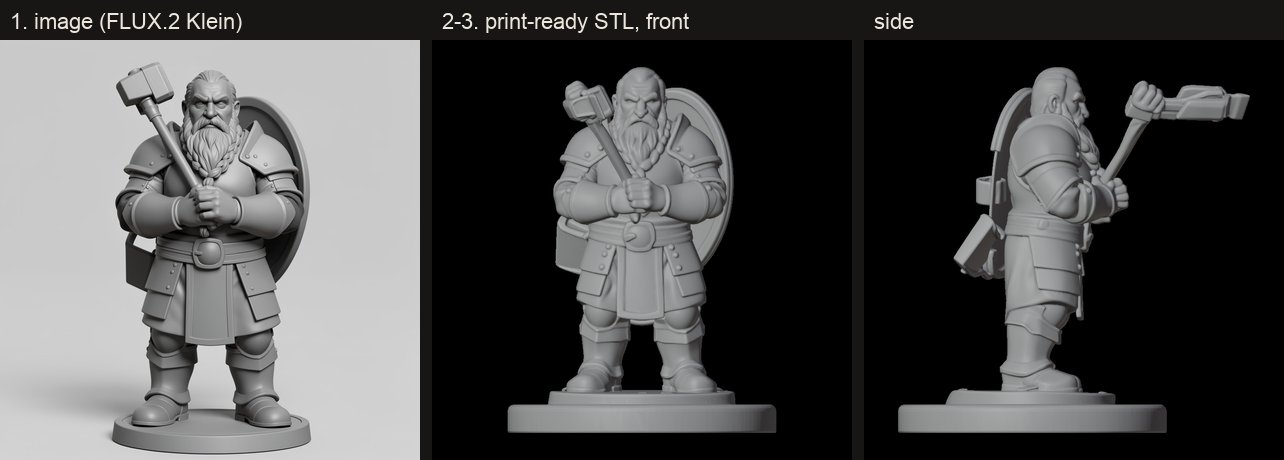
From a picture or a description to a print-ready STL, everything happens on your Mac, unless you choose to have the pictures made online. This page follows a mini through Mimic's three steps, compares the two 3D models, and lists exactly what Mimic downloads and when it talks to the internet.
The pipeline
flowchart TD
  pic["🖼️ Picture"] --> choice{"Grey sculpt first?"}
  text["✍️ Description"] --> draw["Draw the character<br/><i>FLUX.2 Klein, in Draw Things or online</i>"]
  choice -- yes --> redraw["Redraw as a grey sculpt<br/><i>FLUX.2 Klein, in Draw Things or online</i>"]
  choice -- no --> image
  redraw --> image["Character image"]
  draw --> image
  image --> cut["✂️ Cut out the character<br/><i>Apple Vision</i>"]
  cut --> mesh["🧊 3D model<br/><i>TRELLIS.2 or Pixal3D</i>"]
  mesh --> prep["🖨️ Print prep<br/><i>Swift, in Mimic</i>"]
  prep --> out["STL + front, left, right and back previews"]
  out --> slicer["Your slicer"]
Every mini is a job of three steps, the ones the progress popover counts and the mini's log records:
| Step | Shown as | Runs | Makes |
|---|---|---|---|
| 1 | Getting the picture ready | Mimic itself, and Draw Things (or the online service you chose) when a picture is drawn | source.png |
| 2 | Building the 3D shape | mimic _engine: Apple Vision, then the 3D engine |
model.glb |
| 3 | Making the print-ready file | mimic _prep: print prep |
<name>.stl and its previews |
Steps 2 and 3 are Mimic's own binary, started again as a separate program, so Stop ends a step
and everything it started at once. _engine is internal; _prep can be
run by hand to experiment. Each job runs
in a process group of its own, at a lower priority (nice 10), so your Mac stays quick to use
while a mini is made. A step whose file is already there is skipped, which is how Try Again
carries on from the step that failed and a mini stopped by quitting carries on at the next launch.
Step 1: the picture
What happens depends on what you started from:
- Your picture, as it is. It's copied. Pictures are tidied once, when they're added: turned upright and made no larger than 2048 pixels on their longest side, so a 48-megapixel phone photo doesn't slow every step down.
- Your picture as a grey sculpt (Turn it into a grey sculpt first,
--restyle). FLUX.2 Klein redraws it as an unpainted grey miniature: same character, pose and gear, bold readable shapes, feet on the ground, plain grey background. The 3D engine understands that far better than colours, shading and a busy background. A cartoon always gets the sculpt. - A description. FLUX.2 Klein draws a full-body tabletop miniature of it, 1024 × 1024, front view, grey, on a plain background, with limbs and weapons held close to the body. Anything that isn't a character gets a neutral prompt for one whole object at eye level instead.
- What to change. The redraw is told to make that one change and keep everything else. In the app the job then stops so you can check the picture before the slow 3D step (Build Shape); in Terminal it carries straight on.
The variation number is the seed: the same description and number draw the same picture.
FLUX.2 Klein is Black Forest Labs' image model, run by Draw Things, a free Mac app. You download the model inside Draw Things. Mimic talks to it in one of two ways:
- Draw Things' command line tool (
draw-things-cli), which Mimic downloads with its 3D engine. It runs as a program of Mimic's own, so Draw Things doesn't need to be open and its API server doesn't matter. The pinned version only ever generates on your Mac. - Draw Things' API server, at
http://127.0.0.1:7860on your Mac, only when the command line tool isn't there. Mimic opens Draw Things in the background when it needs a picture (unless Open Draw Things when needed is off) and quits it afterwards if it opened it.
Every request names the model and its settings (4 steps, the sampler FLUX.2 Klein was made for), so another kind of model selected in Draw Things can't take over. When you have more than one FLUX.2 Klein downloaded, Mimic uses the one selected in Draw Things, else the largest.
Online instead. Make pictures with (see Settings) can send the same prompts to an online service instead, with your own key. Either way Mimic asks for a PNG of the size Draw Things would make, and scales what comes back to it if it isn't. The key is only ever sent to that service's own addresses, over https.
- Black Forest Labs, online: FLUX.2 Klein 9B (
flux-2-klein-9b), the same model as in Draw Things. A request is submitted, then Mimic asks every half a second whether the picture is ready (for up to five minutes) and downloads it. Stop stops asking at once. - OpenAI, online: GPT Image 2.5 Sunburst (
gpt-image-2.5-sunburst), the one OpenAI recommends for drawing and editing pictures. One request makes each picture, and the picture comes back in its answer; Stop cancels the request. It takes no variation number, so the same description draws a different picture each time.
Step 2: the 3D shape
The cut-out. Apple's Vision framework cuts the character out of the picture, then the edges' colours are pulled in from the character so there's no halo. It takes under a second. Compared with the cut-outs Mimic used before, Vision kept the elf's bow tips and the dwarf's whole hammer head. A picture that's already cut out (at least 2% of it transparent) is used as it is.
The 3D engine is pixal3d.cpp, a C++ program
(trellis-cli) built with ggml for your Mac's graphics chip (Metal). It runs both 3D models:
- TRELLIS.2, Microsoft's model, at its own defaults, 1024 resolution. With pictures of the back and sides, its multi-image mode takes 2 to 8 cut-out pictures, front first.
- Pixal3D, the single-view model, with the settings Mimic was tuned on: a 20° camera, structure guidance 10 (the default 7.5 dropped a sword blade; 13 detached thin parts), 1024 resolution. It builds figures facing the other way from TRELLIS.2, so print prep turns them round to face the front, as your slicer shows it.
Both run with 8 sampling steps rather than the stock 12: the same shape, 16 to 31% faster. If an engine build ever ignored that, Mimic stops it at once rather than let it run the slow way, and asks for a Repair. TRELLIS.2's multi-image mode is the exception: it always runs its own 12 steps, so a mini made from several pictures takes longer.
Step 3: print prep
Mimic's own Swift code sizes the model, centres it on a base (round, square or hex), makes it one watertight solid, thickens thin parts to suit your nozzle, flattens the bottom so it sits on the print bed, and draws the four previews. It takes seconds. Tuning print prep has every step and option.
The 3D models
You choose one when Mimic first downloads its engine, and can switch any time in Settings → 3D Model.
| TRELLIS.2 (the default) | Pixal3D | |
|---|---|---|
| Download | 9.1 GB (9.3 GB with the engine, the first time) | 8.1 GB (8.3 GB the first time) |
| A whole mini takes about | 14 minutes | 8 minutes |
| Good at | What a figure holds or carries: a weapon, a bow, a pet on a shoulder | The crispest surface detail, and speed |
| Less good at | A slightly softer surface; slower on bulky figures | Sometimes loses or misplaces something a figure holds |
| Pictures of the back and sides | Yes | No: one picture |
| Most memory any step used (measured) | 6.9 GB | 5.1 GB |
ID (for --model, mimic models) |
trellis2-q8 |
pixal3d-sv |
The times were measured on an M2 Max with 32 GB. Once you've made a few minis, Mimic's estimates use your own Mac's times instead. Both are 8-bit (q8) versions of the models.
Why TRELLIS.2 is the default: pictures of figures holding or carrying something (the dwarf's hammer and shield, the elf's bow, the halfling's lute, the tiefling's raven) were run through both models with several variation numbers and judged from the side and back. TRELLIS.2 got the held part right 9 times out of 9, Pixal3D 4 out of 10: bows lost when they weren't joined to the hands, the raven a blob from behind, the hammer pushed out in front.
Cartoons are always made with Pixal3D, so It's a cartoon needs Pixal3D downloaded. From the grey sculpt of a flat 2D cartoon, TRELLIS.2 builds the figure out of flat panels, already in its own output, and smoothing afterwards didn't fix it. Pixal3D's comes out smooth.
The two share files. Four of TRELLIS.2's files are byte for byte Pixal3D's (2.2 GB), so with one downloaded, the other copies them instead of downloading them again, and they take no extra space.
What runs where
| Part | Where it runs | Where it comes from |
|---|---|---|
Mimic, the app and mimic |
Your Mac | Mimic's releases |
| Draw Things and FLUX.2 Klein | Your Mac | The Mac App Store, and Draw Things' own model list |
| FLUX.2 Klein online, if you choose it | Black Forest Labs' servers | Your Black Forest Labs account |
| GPT Image online, if you choose it | OpenAI's servers | Your OpenAI account |
draw-things-cli |
Your Mac | Draw Things' own GitHub release, v1.20260430.0 |
| The cut-out | Your Mac (Apple Vision) | Built into macOS |
The 3D engine, trellis-cli |
Your Mac's graphics chip | Mimic's GitHub release pixal3d-d1b4926, built from pixal3d.cpp by Mimic |
| TRELLIS.2's model files | Your Mac's graphics chip | Hugging Face, ilintar/trellis2-gguf |
| Pixal3D's model files | Your Mac's graphics chip | Hugging Face, raven38/pixal3d-sv-q8_0-v1 |
| Print prep and previews | Your Mac | Built into Mimic |
| The AI helper, if you choose one | The service you choose, or Ollama on your Mac | You |
Everything Mimic downloads is pinned: each file has a fixed address (on Hugging Face, a fixed revision of the repository), its size and its SHA-256 written into Mimic. A file that doesn't match is deleted and downloaded again. Downloads resume where they stopped, and a file that's already there and right is kept. A new version of Mimic that pins a newer engine shows the engine check as needing Repair.
The model files' licences come with them: see Licences.
Privacy
Mimic runs on your Mac: no account, no uploads, no subscription. Your pictures and minis never leave it, and neither do your descriptions, unless you choose a cloud AI helper or online pictures (below). Mimic only goes online for these:
- First-launch setup, and downloads you ask for in Settings: the engine from Mimic's GitHub
release,
draw-things-clifrom Draw Things' GitHub release, and the model files from Hugging Face. Mimic only downloads from them. - Checking for updates: each time Mimic opens (unless you turn it off), and when you choose Check for Updates…, Mimic reads the latest release's public information from GitHub. Nothing about your Mac or your minis is sent.
- An AI helper, only if you choose a cloud one in Settings: it receives the description you type, and what you type in What to change, nothing else. Its key stays in your Keychain and is only sent to the address it was saved for. Ollama runs on your Mac, so with it nothing leaves.
- Online pictures, only if you choose them in Settings: the service you chose (Black Forest Labs or OpenAI), and no other, receives the description to draw, or the picture to redraw as a grey sculpt (with what you type in What to change), and sends the picture back. Your 3D models and print files are still made on your Mac. Its key stays in your Keychain.
- Report a Problem makes a file on your Mac and opens GitHub's form in your browser, and so does the report Mimic offers after it quits unexpectedly. Nothing is sent unless you attach the file and send the form yourself.
Mimic's time estimates are learned from your own minis and kept on your Mac only. See Where your files are for everything it keeps.